
Check-ins that fit the first year
The standard cadence uses 14, 30, 90, 180 and 365 days after the confirmed start. Scheduled delivery depends on survey email setup and the active schedule.
Keep the conversation going after the hire
A good provider experience needs attention after the first day. Bring scheduled check-ins, provider feedback and leadership follow-up into one connected dental workspace.
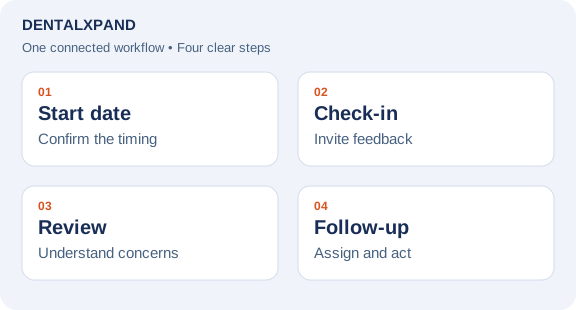
Feedback → owner → follow-through
Starting recordTwo-week check-in · Provider asks for help with the daily schedule
Use the confirmed joining date and configured survey email.
Leadership reads the schedule concern in the provider’s record.
Choose a practice leader, record a due date and follow up with the provider.
The team decides how to respond. A submitted survey does not automatically resolve a concern.
The workflow, explained
DentalXpand helps dental practices and DSOs schedule provider experience check-ins, review responses and keep follow-up attached to the provider record. When a concern needs attention, authorized leadership can assign an owner and a due date so the team has a clear next action.
How it works
Record the provider's actual start date so the check-in schedule has a reliable starting point.
Use configured checkpoints at 2 weeks and 1, 3, 6 and 12 months, or send an authorized manual survey when needed.
Read the provider's feedback in context. A score is a starting point for a conversation, not the whole story.
Give concerns a named owner, a next action and a due date. Keep the response and follow-up connected.
Made for the real handoffs
The standard cadence uses 14, 30, 90, 180 and 365 days after the confirmed start. Scheduled delivery depends on survey email setup and the active schedule.
Authorized users can prepare a private manual survey outside the routine checkpoints. Use it when the team needs feedback about a specific experience or transition.
Keep responses needing attention visible to the authorized leadership team. Review the concern, assign responsibility and record the follow-up date.
Recruiting feedback can capture reasons such as compensation, schedule and location. Review these separately from post-hire provider experience to understand where each journey needs attention.
Your team. Your process.
A collected response helps only when someone can act on it. Use DentalXpand to connect the check-in to a leadership review and the next conversation. During your walkthrough, confirm who can see responses, who assigns follow-up and how the team decides an issue is resolved. A survey alone cannot predict a resignation or guarantee that a provider will stay.
Take the next step
These blank planning worksheets are for your team’s process review. They are not application import templates; keep patient and confidential personnel information in your authorized systems.
Questions before you choose
The standard checkpoints are 14, 30, 90, 180 and 365 days after a confirmed start date, commonly described as 2 weeks and 1, 3, 6 and 12 months. Survey scheduling and email delivery must be configured.
Yes. Authorized users can prepare a manual provider survey outside the routine cadence when an additional check-in is appropriate.
The response can be reviewed in the provider's retention context. Authorized leadership assigns an owner, next action and due date so follow-up is explicit.
These workflows connect responses to a provider record. Do not describe them as anonymous. Confirm who can access the response and explain that to the provider before requesting feedback.
No. DentalXpand organizes feedback and follow-up. Leaders remain responsible for the conversation, the decision and any operational change.
The recruiting workflow supports structured decline feedback, including reasons such as compensation, schedule and location. This is distinct from the post-hire provider check-in process.
No software can guarantee retention. Use consistent follow-up and your own measured outcomes to evaluate whether the process is improving provider experience.
Begin with accurate start dates, a clearly assigned response reviewer and a small pilot. Confirm invitation delivery, access boundaries and how concerns become owned follow-up before expanding.
See monthly pricing and allowances or discuss your setup with DentalXpand.
Start with your process
Tell us about your practices, your team and the next handoff you want to improve.