Dental operations, connected

DentalXpand

Run daily work, provider and DSO operations, dental RCM, credentialing, HR, finance, growth, and Xpand AI in one role-based workspace.

  • Multi-practice ready
  • Role-based access
  • Permission-aware AI

90-second product film

See the complete platform move as one system.

Follow daily work, provider and DSO access, dental RCM, credentialing, HR, finance, growth, administration, security, and Xpand AI through one fictional workspace.

See the whole operation

A working system for the work behind every dental visit.

DentalXpand connects the operational layers that usually live in separate tools, spreadsheets, inboxes, and payer portals.

Teams get one place to understand priorities, move cases forward, and keep the right information visible to the right organization, practice, and role.

Built around the people doing the work

One platform for every team behind the practice.

Give each operational role the context it needs without turning the organization into one unrestricted workspace.

01

Practice owners

See operational health and priorities without chasing updates across separate tools.

02

Multi-practice leaders

Coordinate work across assigned locations while preserving practice-level visibility.

03

RCM and verification teams

Move eligibility, claims, AR follow-up, and billing responsibilities through shared queues.

04

Credentialing coordinators

Keep provider records, documents, payer enrollments, and follow-ups organized.

The complete platform

Nine operating areas, not four isolated tools.

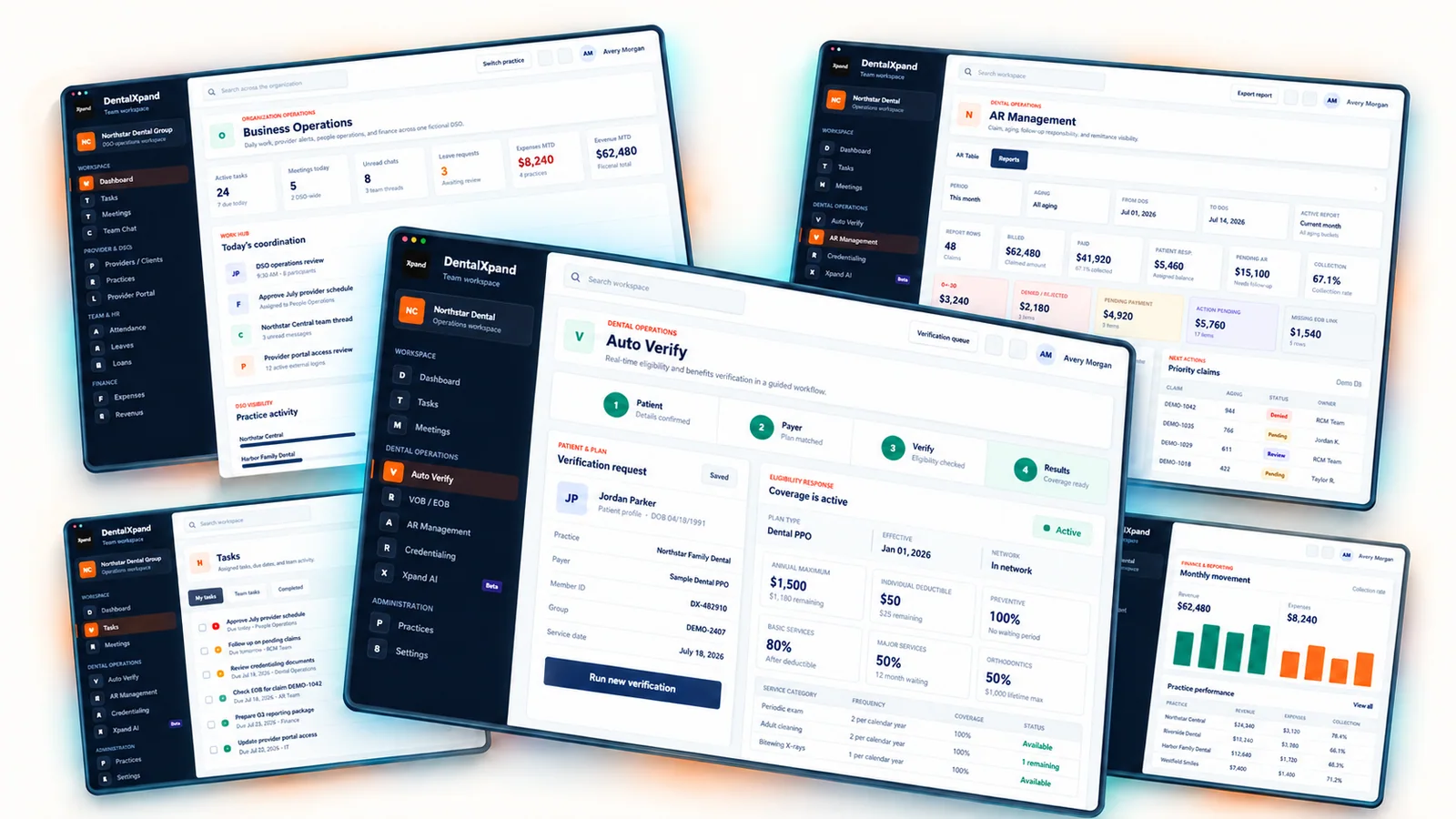
The four product screenshots below are featured views. DentalXpand also runs collaboration, provider access, DSO administration, people operations, finance, growth, security, and automation.

Explore every feature area
Fictional DentalXpand DSO operations workspace showing tasks, meetings, chat, provider logins, HR, expenses, and revenue
Fictional DSO Workspace - all people, practices, and metrics are fictional
01

Work Hub

Daily execution and communication for every internal team.

  • Dashboard
  • Tasks
  • Meetings
  • Team chat
  • Notifications
  • Documents
02

Provider & DSO

Separate provider access and multi-practice control.

  • Provider login
  • Provider dashboard
  • DSO workspace
  • Practices
  • Client tasks
  • Portal messaging
03

Dental RCM

Connected insurance and revenue-cycle workflows.

  • VOB / BOB
  • Auto Verify
  • AR Follow Up
  • AR Management
  • Auto AR
  • Medical Billing OS
04

Credentialing

Provider data and payer progress for internal and client views.

  • Credentialing portal
  • Provider data vault
  • Client reports
  • Payer case progress
  • Follow-up history
  • Document review
05

Team & HR

People operations from attendance through recruitment.

  • Teams
  • Attendance
  • Time tracking
  • Leave management
  • Employee loans
  • Recruitment
06

Finance & Reports

Internal financial visibility and management reporting.

  • Expenses
  • Revenue
  • Operational reports
  • Exportable records
  • Practice views
  • Role-based totals
07

Marketing & Growth

Lead research, outreach, and pipeline execution.

  • Lead generation
  • Leads directory
  • Cold calling CRM
  • Email outreach
  • Marketing scraper
  • Follow-up queues
08

Admin & Security

Accounts, roles, organizations, and controlled administration.

  • Employees
  • User accounts
  • Role management
  • Data vault
  • Platform admin
  • Practice access
09

AI & Automation

Permission-aware assistance and repeatable workflow automation.

  • Xpand AI
  • VOB Auto-Fill
  • Auto AR
  • NATO phonetics
  • Support Hub
  • Scoped source context

Inside DentalXpand

Four featured views from a much larger platform.

These screenshots highlight selected workflows from the complete fictional Demo Workspace shown above.

Operational command center

Know what needs attention before the day gets away from you.

Bring task health, verification volume, AR follow-ups, credentialing progress, and team movement into one role-aware overview.

DentalXpand fictional demo dashboard showing tasks, eligibility, AR, credentialing, and priorities
Demo Workspace · Fictional records and metrics

Operational connections

Practical connections for the work between systems.

Availability depends on configured services and account credentials. PMS-ready chart comments fit existing workflows without requiring a direct PMS connection.

Eligibility

Stedi

Payer discovery and eligibility workflows

Claims and ERA

Claim.MD

Claim follow-up, responses, and remittance workflows

PMS-ready output

Chart comments

Formatted for Open Dental, Curve Hero, and Eaglesoft workflows

Connected by design

From daily coordination to business control.

Each department keeps the detail it needs while contributing to one role-aware operating picture.

  1. 01

    Coordinate the day

    Connect dashboards, tasks, meetings, team chat, notifications, and documents.

  2. 02

    Run dental RCM

    Move verification, billing, claims, AR, and follow-up work through owned queues.

  3. 03

    Serve providers and DSOs

    Give providers a focused portal while DSO teams retain practice-level control.

  4. 04

    Manage people

    Handle attendance, time, leaves, loans, recruitment, agreements, and notices.

  5. 05

    Track the business

    Review expenses, revenue, operational reports, leads, and outreach activity.

  6. 06

    Control and automate

    Apply roles, practice scope, platform controls, and permission-aware AI.

Context with boundaries

AI that works inside the user’s permitted workspace.

DentalXpand is structured around organizations, practices, memberships, and roles. Xpand AI follows that operational context instead of treating every connected record as one shared pool.

  • Organization scopeKeep tenant workspaces logically separated.
  • Practice visibilityLimit operational views to assigned practices.
  • Role permissionsUse the current user’s allowed pages and actions.
Explore Xpand AI
Xpand AI fictional demo showing organization, practice, and role scope
Permission-aware Demo Workspace

Trust architecture

Boundaries that scale with the organization.

DentalXpand applies organization, practice, and role context across the workspace instead of relying on one shared data view.

01Tenant-aware context

Keep administration and workspace activity inside the active organization context.

02Practice-scoped access

Limit users to assigned practices and the pages permitted by their role.

03Database policy layer

Use row-level policies for organization and practice-aware data access.

04Auditable administration

Record key administrative changes and support-session activity as audit events.

Common questions

What teams usually ask before a demo.

A direct view of product scope, data boundaries, and external connections.

Ask another question
What operational work can DentalXpand manage?

DentalXpand covers daily tasks, meetings, chat, provider and DSO access, dental RCM, credentialing, attendance, leaves, loans, recruitment, expenses, revenue, reporting, growth workflows, administration, and permission-aware AI.

Does DentalXpand replace our practice management system?

No. It is designed to organize the operational work around your practice systems. PMS-ready chart comments support existing workflows without requiring a direct PMS connection.

Can a multi-practice organization control access by location?

Yes. The platform is structured around organizations, memberships, assigned practices, and role permissions so each user can receive a workspace shaped around their responsibilities.

How is Xpand AI kept inside the right workspace?

Xpand AI is designed to use the active organization, allowed practices, role permissions, and permitted workspace context rather than treating every connected record as one shared pool.

Which external services can be configured?

Configured deployments can connect eligibility workflows to Stedi and claim or ERA workflows to Claim.MD. Availability depends on service accounts, credentials, and deployment configuration.

What is the first step for a new organization?

Start with a demo and workflow review so the organization structure, practices, roles, operational priorities, and required connections can be mapped before onboarding.