

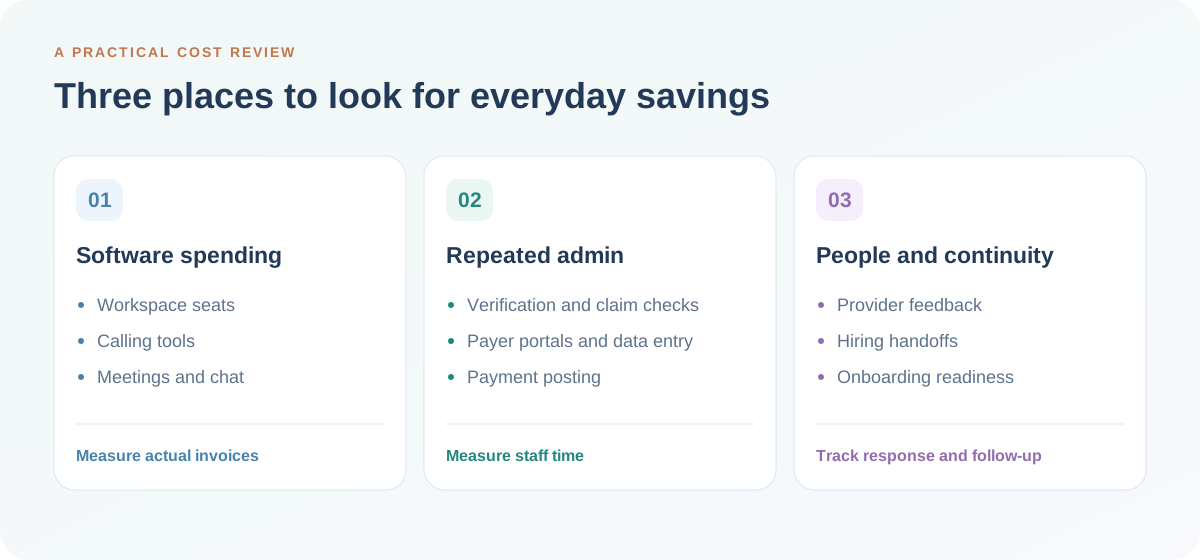
A software renewal here. Another payer call there. A provider concern that reaches leadership only after a resignation. The cost of running a dental group often grows through small, repeated demands on your people, your systems and your time.
For DSO owners, operations VPs and practice leaders, reducing overhead starts with seeing where that work repeats. Which subscriptions serve the same purpose? Which billing tasks still depend on someone sitting on hold? Where does a missing handoff create another day of follow-up?
DentalXpand brings provider recruitment and retention, dental insurance verification, claims follow-up and team coordination into a connected workspace. Here are ten practical ways to use that connection to reduce avoidable spending, recover staff capacity and support more consistent practice operations.
Explore the 10 savings opportunities
1. Reduce extra workspace accounts used only for daily coordination
As a dental group grows, it is easy to add another account whenever a new teammate joins. Some people need a full productivity suite. Others mainly need to receive a workflow update, send a message or coordinate an assigned task. Paying for the same communication function in several tools deserves a closer look.
Xpand combines workflow email and built-in team chat with the work being discussed. A recruiter can keep a candidate update close to the hiring process. A practice lead can discuss an outstanding task where the next owner can find it.
Where the saving comes from: fewer overlapping accounts purchased solely for coordination, plus less time retrieving context from separate conversations. Review each user’s actual needs before changing subscriptions. Xpand workflow email does not replace a hosted business mailbox, office document suite or every function in an existing workspace plan.
Leadership check: Which paid seats are used primarily for internal messages and operational updates?
2. Consolidate calling tools around the work your team is doing
A scattered phone setup can mean another application, another sign-in and another place to find the details behind a call. Those small interruptions multiply when staff move between practices, patients, providers and billing responsibilities.
Through Twilio and Vonage integrations, Xpand can bring incoming and outgoing calls into the workspace. Your team can review whether this setup reduces the need for separate calling applications or duplicated software licenses.
Where the saving comes from: a simpler tool setup and less switching during everyday work. Phone numbers, calling usage and provider charges can still apply. Compare the complete calling configuration, number assignments and usage costs before retiring an existing service.
Leadership check: Are you paying for both a calling platform and separate tools that duplicate its day-to-day coordination?
3. Hear provider concerns before a departure becomes a staffing emergency
When a provider leaves unexpectedly, the impact reaches beyond recruiting. Practice leaders may need to reorganize schedules, arrange coverage and reassure patients while finding and onboarding a replacement. Earlier conversations create more room to respond.
Xpand supports anonymous surveys, scheduled check-ins and provider feedback so concerns have a place to surface. Leadership can look for patterns, understand the reasons people may consider leaving and assign appropriate follow-up. For identified feedback, providers can see who is reviewing their concern and what action is being taken.
Use anonymous feedback to understand themes without linking it back to an individual. Use identified feedback when a provider wants personal follow-through. The distinction matters when building trust.
Where the saving comes from: opportunities to address preventable friction and prepare earlier for staffing needs. Surveys cannot guarantee that a provider will stay or that every departure will be predicted. Their value depends on whether leaders listen, respond and close the loop.
Leadership check: Can your team explain what happened after the last provider concern was raised?
Explore dental provider retention software and the provider check-in workflow guide.

4. Reduce the hours spent calling payers for benefit breakdowns
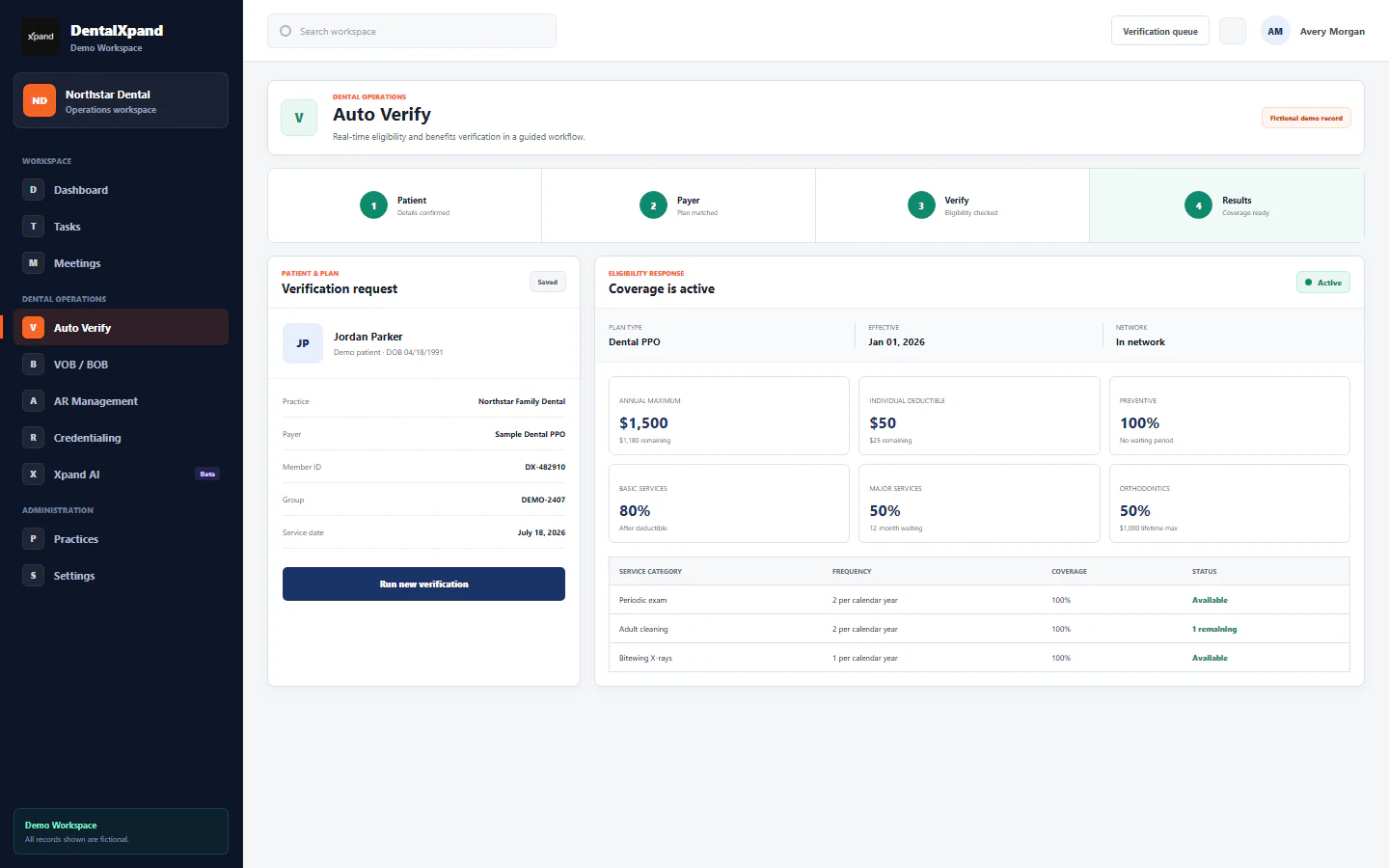
Insurance verification can absorb a large part of the billing team’s day: gather patient information, contact the payer, obtain benefit details, complete a form and place the result where the practice can use it. Repeating that process patient by patient makes volume difficult to manage.
Xpand supports bulk dental insurance verification with capacity of up to 1,000 patients in an hour through supported connections. Teams can upload a patient CSV, check an individual patient, verify tomorrow’s patients from a connected PMS or ask Xpand AI to start a supported verification workflow.
Already have a verification document? Upload a scan, raw text, CSV or PDF to organize the supplied information into a standard breakdown of benefits. Document conversion structures existing information; a live payer check retrieves an available payer response.
Where the saving comes from: less routine calling, form preparation and repeated handling. Actual throughput depends on payer availability, enrollment, input quality and the configured connection. Your team still reviews returned benefits and handles incomplete responses or questions that need direct clarification.
Leadership check: How many staff minutes does a completed, reviewed verification require today?
See how dental insurance verification software fits into your practice workflow.
5. Bring remote-team meetings and chat into one workspace
Overseas billing teams, remote administrators and multi-location leaders need dependable ways to speak with one another. A growing collection of chat and meeting subscriptions can make that collaboration more expensive and fragmented.
Xpand includes built-in unlimited meetings and chats for conversations with teammates and clients. Bringing discussions closer to tasks and follow-ups can reduce the need for separate subscriptions used only for those conversations.
Where the saving comes from: consolidating overlapping communication tools and reducing the effort of moving from a discussion to an assigned action. Confirm your group’s meeting requirements, participant access and selected plan during setup, especially where another platform serves additional purposes.
Leadership check: How many meeting and chat tools do your teams actively pay for, and which functions overlap?
6. Automate routine claim-status checks so billers can work on exceptions
A routine claim-status call and a complex claim resolution need different levels of attention. When the same staff members must spend hours checking whether claims have moved, they have less time to investigate the records that require judgment.
Xpand can run up to 1,000 claim-status checks in an hour through supported connections. Teams can use a batch list, individual claim details or supported AI-assisted workflows to collect available responses and organize the next steps.
Where the saving comes from: less time gathering routine status updates and more capacity for unresolved claims, documentation questions and patient support. A status response does not itself resolve a denial or establish that money has been received. Payer support, enrollment and connection availability determine which checks can run.
Leadership check: What share of your AR team’s day is spent retrieving a status rather than acting on it?
Explore dental claims and AR follow-up.
7. Cut repeated payer-portal logins and copied status notes
The cost of a payer check includes the work around it. Staff locate a login, find the right record, copy a response, tell a colleague and later repeat the search when someone asks for an update.
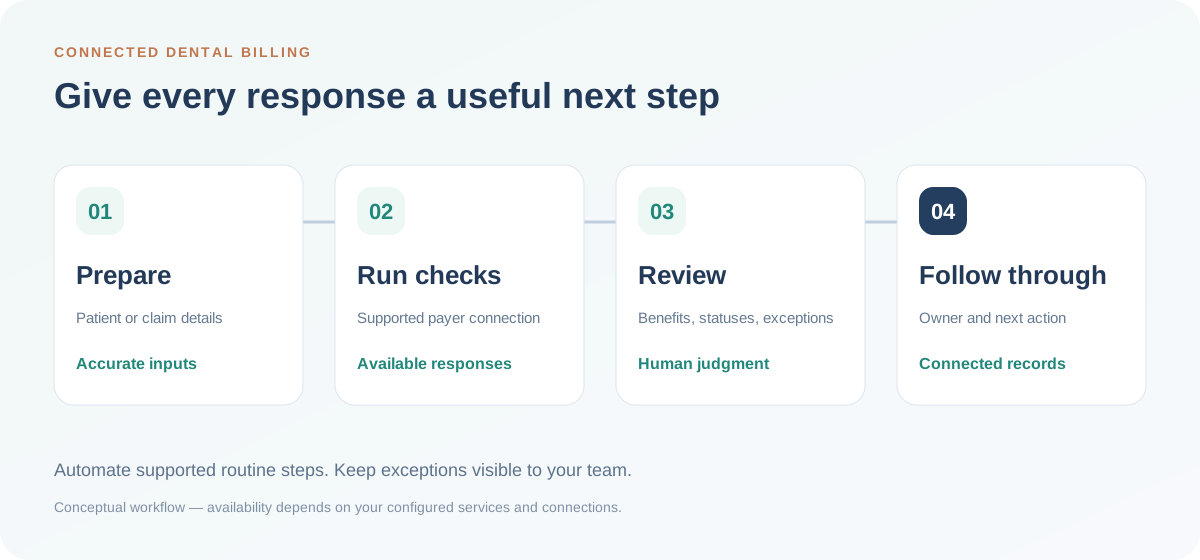
Xpand brings supported eligibility and claim-status workflows into one workspace, with records and follow-up ownership available to the team. This can reduce repeated portal visits and routine calls for checks available through the configured connection.
Where the saving comes from: fewer repeated administrative steps around each transaction. Some payer issues and unsupported transactions may still require an external portal or a phone call. Track those exceptions so you can see where automation is helping and where human effort remains necessary.
Leadership check: How often do two teammates retrieve the same payer information because the first response is hard to find?
8. Reduce duplicate entry between benefit forms and your PMS
A fast verification loses some of its value if someone must then retype the results into another system. Repeated copying takes time and creates another point where the team has to check its work.
Xpand can produce standardized benefit forms for download and send them to a connected PMS. Supported record and table updates help carry the information into the practice workflow. The exact data, system version and update behavior are confirmed for your connection.
Where the saving comes from: fewer manual transfers and less duplicate handling of the same information. Keep a review step for exceptions, and confirm which fields update automatically before changing your team’s responsibilities.
Leadership check: After a verification is complete, how many times is the result copied, uploaded or entered again?
Review practice system connections with your PMS and workflow requirements.
9. Automate supported payment posting and secondary claim submission
Billing work continues after the initial claim. Payment posting and secondary claims can create recurring queues that consume attention even when the next step follows a familiar pattern.
Xpand supports automated payment posting and secondary claim submission for configured workflows. Your team can concentrate on exceptions, supporting documentation and cases that need a person’s decision.
Where the saving comes from: reduced repetitive processing and clearer exception ownership. Payment posting depends on the supported remittance and PMS setup; it is distinct from a claim-status check. Confirm the available workflow, review responsibilities and handling of adjustments during implementation.
Leadership check: Which posting and secondary-claim steps are repeated manually every day, and which exceptions require review?
10. Reduce the rework between recruiting, agreements and onboarding
Hiring involves several people, often across locations. An accepted offer can trigger another chain of emails to confirm terms, find documents, check signatures and tell the practice what to prepare. Missing context creates repeated work at an important moment.
Xpand connects openings, applications, interviews, offers, agreements and onboarding with provider and practice context. The receiving team can see what has been agreed, what remains open and who owns the next step.
Where the saving comes from: less duplicate coordination and fewer avoidable handoff delays. Keep credentialing readiness, agreement completion and the confirmed start date visible as separate requirements so nobody assumes one completed step means everything is ready.
Leadership check: Can the practice lead prepare for a provider’s first day without asking recruiting to resend the details?
Explore dental recruiting software or use the provider hiring handoff checklist.
Build a savings estimate your leadership team can trust
Start with your own baseline. Gather subscription invoices, transaction volumes and a sample of staff time spent on repetitive work. Separate the following measures rather than combining them into one impressive-looking number.
| Measure | What to include | How to interpret it |
|---|---|---|
| Direct spending | Subscriptions actually retired; changes to overtime, external processing fees or other paid costs. | Compare actual invoices before and after implementation. |
| Recovered capacity | Staff hours no longer spent on repetitive checks, copying or coordination. | Track where those hours go. More available time is not automatically a payroll reduction. |
| Operational continuity | Earlier provider follow-up, clearer hiring handoffs and fewer repeated searches. | Monitor response times, unresolved issues and staffing readiness; avoid assigning an assumed dollar saving. |
Avoid counting the same minutes twice. If you already measured the entire verification workflow, its portal logins and data entry may be included. Use one end-to-end measurement or clearly separated steps.
A practical first 30 days with your team
- Week 1: identify the repeated costs. List paid tools, choose one billing workflow and ask practice leaders where they repeatedly chase information.
- Week 2: confirm connections and responsibilities. Review payer IDs, required enrollment, PMS compatibility and who handles exceptions. Agree on a baseline measure.
- Week 3: pilot with a manageable workload. Compare a sample of completed work with the previous process. Check response quality and follow-through as well as speed.
- Week 4: review what changed. Identify subscriptions you can consolidate, capacity you can redeploy and the next workflow worth improving. Use the pilot results to plan rollout across practices.
Common questions about saving with Xpand
Does Xpand replace our dental practice management system?
Your PMS can remain the system your team uses for clinical charting and scheduling. Xpand connects the surrounding operational work and can synchronize supported data through configured PMS connections. Confirm your system, version and workflow before deciding which existing tools to retire.
Are 1,000 verifications or claim checks per hour guaranteed?
No. These are upper-end processing capacities for supported workflows. Actual volume varies with payer availability, enrollment, data quality and connection configuration. Reviewing exceptions and completing follow-up can take additional time.
Are phone calls free with Xpand?
Twilio and Vonage integrations bring calling into the workspace. Number rental, usage and other connected-service charges may apply. Include those costs when comparing your current phone setup.
Will provider surveys stop people from leaving?
Surveys and check-ins help leaders hear concerns, understand patterns and follow through. Retention also depends on the provider’s experience and the actions your organization takes. Use feedback to improve support and prepare earlier, without assuming a guaranteed retention outcome.
Where should a DSO start?
Choose a frequent, measurable workflow with a clear owner. Insurance verification, routine claim-status checks or duplicate software subscriptions often provide a concrete starting point. Add provider feedback and hiring handoffs to the review when continuity and staffing are your larger concerns.
PUT YOUR BUDGET TO WORK
Find the savings opportunities hiding in your daily work.
Bring your payer list, PMS details and current tool setup. We’ll walk through how Xpand fits your dental group and which workflows are worth reviewing first.
Explore savings for your dental group ↗ Compare Xpand plans →
Product capabilities described here reflect the Xpand workflows covered in this article. Availability depends on your selected plan, enabled services and supported connections. Illustrations and product previews explain workflows; they do not present customer results.